Publishing Your Site
Publishing on Simple Page means updating your ENS contenthash to a new IPFS CID. The content is staged on IPFS, and the ENS transaction is the public proof that you chose the new live version.
Before You Publish
- Review your pages in Preview mode.
- Check internal links.
- Check uploaded file paths.
- Connect the wallet that owns or manages the ENS name.
- Make sure you are on the expected chain.
- Have an active Simple Page subscription for the target domain.
The Publishing Process
- Open the Publish tab.
- Select the ENS name to publish at.
- Review changed pages, files, and settings.
- Choose whether to update the Simple Page template when a newer template is available.
- Confirm overwrite if another site is already published at a different selected domain.
- Click Publish.
- Sign the ENS contenthash transaction in your wallet.
- Wait for the transaction to confirm.
After confirmation, the site is live at yourname.eth.link.
What Gets Published
Simple Page builds a new IPFS root containing:
- Markdown pages and rendered HTML.
- Uploaded files and generated avatar/favicon artifacts.
settings.jsonand generatedtheme.css.manifest.jsonandmanifest.webmanifest.rss.xmlwhen RSS-enabled pages exist.sidenav.jsonfor navigation._prev/0/containing the previous root for history.
Subscription
Simple Page subscriptions are priced at $12 a year, paid in ETH.
- The app sends the contract a one-month fee buffer to account for ETH/USD price movement.
- The contract charges the exact calculated subscription fee and refunds excess ETH.
- There is no automatic renewal.
- Renewals extend the current expiry when your subscription is still active.
Make sure the subscription is linked to your own ENS domain. If you came from a template, check the domain field before paying.
Where Your Site Lives
After publishing, your ENS name points to an IPFS CID. It can be loaded through ENS/IPFS gateways such as:
yourname.eth.linkyourname.eth.limoyourname.eth.ac
All gateways resolve the same ENS contenthash. If one gateway is unavailable, try another.
Draft Publishing
Drafts submitted by CLI agents are published from the Drafts tab instead of the normal Publish tab. The final action is the same: the ENS owner signs a setContenthash transaction for the selected CID.
See CLI Reference for creating drafts.
After Publishing
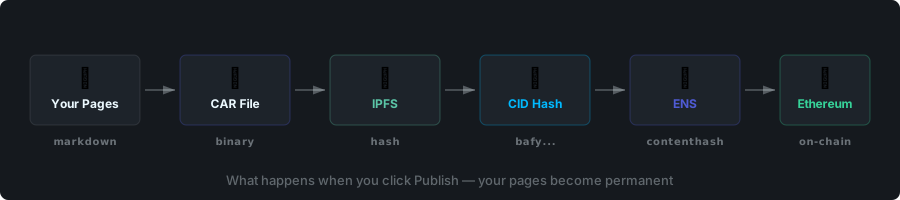
- Your new content is available through ENS gateways after confirmation.
- Nodes index the ENS event and finalize the new CID.
- The previous version remains addressable by CID and linked through
_prev/0/. - You can open History to inspect or restore previous versions.